

kis专业版16.0数量金额总账/明细账显示金额,但是没显示数量
服务热线:400-665-0027
新购有特价、金蝶老客户升级金蝶云产品可以享受5折优惠,送手机、送话费,好礼不断!
问题描述:数量金额总账/明细账显示金额,但是没显示数量,具体情况如下图所示
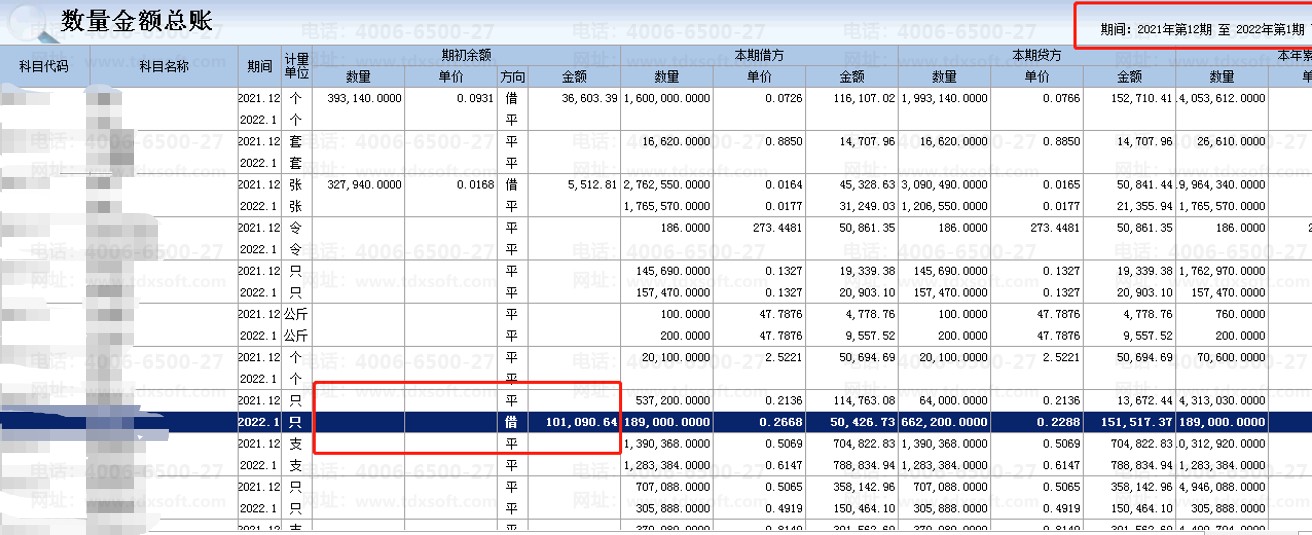
出现以上情况可以按照下列步骤进行排查:
1、查询数量金额表的情况,专业版中数量金额表是t_quantitybalance。查询该表该科目的数据,参考以下sql语句:
select * from t_quantitybalance where faccountid in (select faccountid from t_account where fnumber='科目代码')
t_quantitybalance表的字段名和解释如下:
| 表名 | 字段名 |
字段含义 |
| t_quantitybalance | fyear | 年度 |
| t_quantitybalance | fperiod | 期间 |
| t_quantitybalance | faccountid | 科目ID |
| t_quantitybalance | fdetailid | 核算项目ID |
| t_quantitybalance | fcurrencyid | 币别ID |
| t_quantitybalance | fbeginqty | 期初数量 |
| t_quantitybalance | fdebitqty | 本期借方数量 |
| t_quantitybalance | fcreditqty |
本期贷方数量 |
| t_quantitybalance | fendqty | 期末数量 |
2、大多数情况,异常科目的fbeginqty和fendqty都是null。如果是null值,则不会在软件中显示数量。
查询语句如下:
select * from t_quantitybalance where fbeginqty is null
要特别留意最初出现的期间是哪一期,需要反结账到最初出现问题的期间
3、反结账后,需要将这部分的异常数据进行修改,修改语句如下:
update t_quantitybalance set fbeginqty=0,fendqty=0 where fbeginqty is null
4、执行语句后,再进行结账,数据即可正常显示