

为何在专业版金蝶kis系统中点击调入模式凭证,提示:Element not found。
服务热线:400-665-0027
新购有特价、金蝶老客户升级金蝶云产品可以享受5折优惠,送手机、送话费,好礼不断!
【问题描述】
专业版凭证点击调入模式凭证,提示:Element not found。
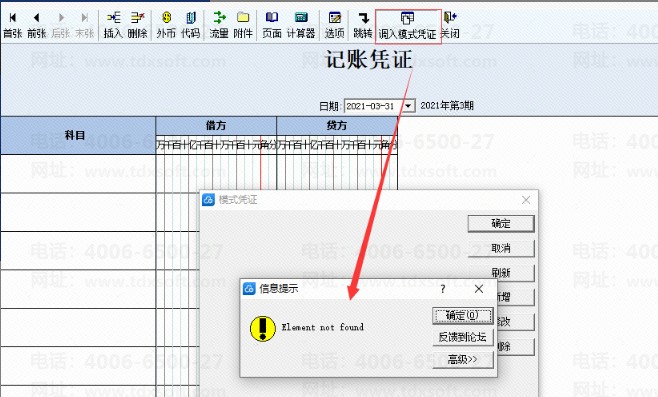
【原因分析】
原因:模式凭证t_VoucherTemplate存在异常模式凭证类别FTypeID。
【解决方案】
可参考以下脚本执行处理:
delete b
from t_VoucherTemplate a
join t_VoucherEntryTemplate b on a.FVoucherTempID =b.FVoucherTempID
where FTypeID not in (select FTypeID from t_VoucherTemplateType)
go
delete from t_VoucherTemplate where FTypeID not in (select FTypeID from t_VoucherTemplateType)
go
【注意事项】
正式账套执行脚本前请先做好备份,建议待在测试账套中核实无误后再在正式账套中执行。